
Deleting a text message does not always mean it is permanently gone. On iPhone, deleted conversations are typically stored in the Recently Deleted folder for up to 30 days, allowing users to restore them if needed. Android devices may offer similar recovery options, but availability depends on the device model, messaging app, and backup settings. Even after messages are permanently deleted, recovery may still be possible in some cases, although it is never guaranteed. In this article, we explain how recently deleted messages work, the most common ways to recover them, the factors that affect recovery success, and when specialized recovery tools may be helpful.
Recently Deleted Messages: How to Recover Deleted Texts on iPhone and Android
Knowledge
2025-01-21
-
Content
- What Are Recently Deleted Messages?
- How Long Do Recently Deleted Messages Stay?
- How to Recover Recently Deleted Messages
- Can Permanently Deleted Messages Be Recovered?
- Tools Used to Recover Deleted Messages
- Frequently Asked Questions About Recently Deleted Messages
- Conclusion
-
Content
- What Are Recently Deleted Messages?
- How Long Do Recently Deleted Messages Stay?
- How to Recover Recently Deleted Messages
- Can Permanently Deleted Messages Be Recovered?
- Tools Used to Recover Deleted Messages
- Frequently Asked Questions About Recently Deleted Messages
- Conclusion
What Are Recently Deleted Messages?
Recently Deleted Messages are text messages that have been removed from your inbox but are temporarily retained by the system instead of being erased immediately.
This folder acts as a holding area where deleted messages remain available for a limited period of time. During this retention period, users can review and restore conversations that were deleted by mistake.
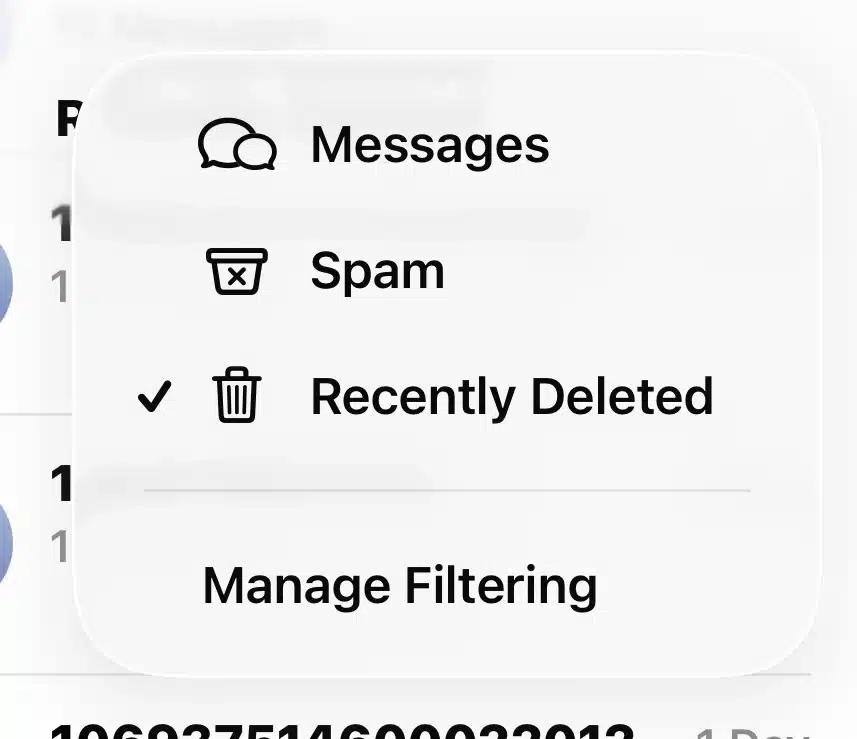
On iPhone, the Messages app includes a dedicated Recently Deleted folder that typically stores deleted texts for up to 30 days. On Android devices, similar functionality may be available, but support depends on the messaging app and backup features in use.
In simple terms, Recently Deleted Messages provide a short recovery window before messages are permanently removed.
How Long Do Recently Deleted Messages Stay?
The amount of time deleted messages remain recoverable depends on the device and messaging platform.
On iPhone
Apple’s Messages app typically keeps deleted messages in the Recently Deleted folder for up to 30 days. During this period, users can restore conversations or remove them permanently at any time.
On Android
There is no universal retention period for deleted messages on Android devices. Recovery options vary depending on the messaging app and backup settings. For example, Google Messages, Samsung Messages, and cloud services such as Google Drive may each handle deleted data differently.
As a result, the length of time deleted messages remain available can vary significantly from one Android device to another.
How to Recover Recently Deleted Messages
If you deleted a message by mistake, there are several ways to recover it depending on your device and available backups.
Recover from the Recently Deleted Folder
On iPhone, open the Messages app and go to the Recently Deleted folder. Select the conversations you want to restore and tap Recover. This method works only if the messages are still within Apple’s retention period.
Restore from iCloud or Google Backup
If the messages are no longer in the Recently Deleted folder, you may be able to recover them from a cloud backup. iPhone users can restore data from iCloud, while Android users may recover messages from Google Drive or other cloud services if backups were enabled before the deletion occurred.
Restore from Local Backups
Messages may also be recovered from backups stored on a computer. For example, iPhone users can restore from Finder or iTunes backups, while some Android devices support recovery from manufacturer-specific backup software.
The success of any recovery method depends on whether the deleted messages were retained in a folder or included in a backup created before the deletion.
Can Permanently Deleted Messages Be Recovered?
Permanently deleted messages may still be recoverable, but there is no guaranteed outcome. In some cases, deleted texts can be restored from backups or recovered from device storage. In others, they may be permanently inaccessible.
Whether recovery is possible depends on several technical factors:
- Device Model and Operating System
Different devices and operating system versions manage deleted data in different ways. Newer smartphones often include stronger security protections, which can reduce the chances of recovering deleted messages.
- Encryption
Most modern smartphones use encryption to protect user data. Even if deleted messages remain on the device, they may not be recoverable if the necessary encryption keys are unavailable.
- Data Overwriting
When new data is written to the device, it may overwrite the storage space previously used by deleted messages. Once this happens, recovery becomes much less likely.
- Secure Deletion
Some devices and applications remove data more thoroughly, leaving little or no recoverable information after deletion.
- Backup Availability
Backups are often the most reliable recovery source. If the deleted messages were included in an iCloud, Google Drive, iTunes, Finder, or local backup created before deletion, they may still be restored even if they are no longer accessible on the device itself.
In short, permanently deleted messages are sometimes recoverable, but success depends entirely on the specific device, operating system, storage condition, and available backups.
Tools Used to Recover Deleted Messages
When standard recovery options are no longer available, specialized software may help recover deleted messages from backups or, in some cases, from the device itself.
Consumer Recovery Tools
Several consumer-focused tools are widely used to recover deleted messages, photos, contacts, and other mobile data:
- Fone– A widely used recovery tool that supports messages, photos, contacts, and other mobile data.
- Disk Drill Data Recovery –A user-friendly recovery tool that can help recover deleted messages from iPhone backups and other recoverable data sources. It is known for its intuitive interface and strong overall recovery performance.
- Stellar Data Recovery for iPhone– Designed to restore deleted messages and other data from iOS devices, iTunes backups, and iCloud backups.
- iMobie PhoneRescue– Supports the recovery of deleted messages, contacts, and app data from both mobile devices and existing backups.
Professional Mobile Forensics Tools
For more advanced recovery and analysis, investigators often rely on professional forensic platforms:
- Cellebrite UFED – Known for deep extraction capabilities and broad device support.
- MSAB XRY – Widely used by law enforcement for mobile data acquisition and examination.
- Oxygen Forensic Detective – Strong in application, cloud, and communication analysis.
- SalvationDATA AFA9500 – An integrated mobile forensic solution designed for rapid mobile data extraction and on-site investigations.
These tools are built for investigative workflows and provide structured extraction, analysis, and reporting capabilities.
While no tool can guarantee the recovery of permanently deleted messages, specialized software may provide additional recovery options when standard recovery methods are unsuccessful.
Frequently Asked Questions About Recently Deleted Messages
1.Is there a 100% success rate for recovering recently deleted messages?
No tool can guarantee a 100% recovery success rate. Recovery depends on factors such as the device model, operating system, encryption, backup availability, and whether the deleted data has been overwritten. If the underlying data is no longer accessible, recovery will not be possible regardless of the tool used.
2.How quickly should I act after deleting important messages?
The sooner you attempt recovery, the better. Continued use of the device may overwrite the storage space previously used by the deleted messages, which can significantly reduce the chances of successful recovery.
3.Can recovery tools access deleted messages from encrypted smartphones?
Sometimes, but not always. Modern smartphones use strong encryption, which may prevent recovery if the necessary encryption keys are unavailable.
4.Why do different recovery tools produce different results?
Each tool uses different extraction methods and supports different devices, operating systems, and apps. As a result, one tool may recover data that another cannot.
5.When should I consider using professional forensic tools?
Professional forensic tools are worth considering when you need a more comprehensive and reliable recovery process. In addition to extracting deleted messages, these tools are designed to preserve data integrity, document the recovery process, and generate reports that can be used for investigative or legal purposes.
Conclusion
Deleting a text message does not always mean it is gone forever. In many cases, recently deleted messages can be restored from a temporary retention folder or recovered from cloud and local backups.
Even when messages have been permanently deleted, recovery may still be possible depending on the device, operating system, encryption, and whether the data has been overwritten.
While consumer recovery tools can help in some situations, professional forensic solutions are often used when a more comprehensive and forensically sound recovery process is required.
The most important takeaway is simple: the sooner you attempt recovery, the greater the chance of retrieving deleted messages successfully.


