Top Digital Forensics Software in 2026: A Practical Buyer’s Guide

Knowledge
2025-01-20

Last Update: 2026-9-4

Digital forensics software is a category of specialized tools used to acquire, preserve, and analyze data from computers, mobile devices, memory, and cloud accounts for legal or investigative purposes. In 2026, the category has expanded well beyond disk imaging and file recovery — modern platforms now need to handle cloud evidence, endpoint triage at scale, and increasingly, AI-assisted analysis of large evidence sets.

This guide compares the tools we use most often, organized by the specific job each one is actually good at — rather than a single flat ranking — because “best” depends entirely on whether you’re doing courtroom-grade disk forensics, mobile extraction, memory analysis, or incident response triage.

Quick Answer: Best Digital Forensics Software by Use Case

Use Case Recommended Tool Free/Open-Source Option
Disk & file system analysis (general) X-Ways Forensics Autopsy / The Sleuth Kit
Mobile device extraction Cellebrite UFED —
Memory (RAM) forensics Volatility 3 Volatility (open-source)
All-in-one / cloud & mobile combined Magnet AXIOM —
Bootable / no-install triage Paladin Forensic Suite Paladin (free build available)
Video & CCTV forensics VIP 3.0 (SalvationDATA) —
Budget-limited / classroom use Autopsy + Sleuth Kit Yes

Notable Digital Forensics Software in 2026

For Computer & Disk Forensics

1. Autopsy

autopsy

Autopsy is a free, open-source digital forensics platform built on top of The Sleuth Kit’s command-line engine, giving investigators a full GUI-based starting point for file system analysis, timeline reconstruction, and keyword searches.

PROS

  • ✓ Extensive Analysis Capabilities: Autopsy’s feature set ranges from file filtering to registry analysis, making it a flexible tool for a wide range of investigations.
  • ✓ Community Support: Due to its open-source nature, it benefits from widespread use and participation, resulting in steady development.
  • ✓ Educational Resource: Its numerous features and zero price tag have made it a popular choice in classrooms.

CONS

  • ✗ Performance Issues: When dealing with larger data sets, Autopsy can be slow, affecting efficiency.
  • ✗ Limited Support: Although community support is robust, official support might be lacking, especially for complex queries.

2. FTK (Forensic Toolkit)

ftk

FTK is an established, enterprise-grade forensic analysis platform with strong data processing throughput and case-collaboration features.

PROS

  • ✓ Robust Processing Capability:It’s capable of processing massive amounts of data quickly, allowing for prompt analysis.
  • ✓ Versatility: Useful for a wide range of forensic investigations because to its flexible file format support and extensive set of features.
  • ✓ Collaborative Functionality: As a result of improved teamwork, investigations can go more quickly.

CONS

  • ✗ Cost: As a premium service, it can be too expensive for some businesses, especially those of a smaller size.
  • ✗ Complexity: Less savvy users may be put off by the software’s steep learning curve, which could slow down the investigation.

3. X-Ways Forensics

x-ways-forensics

X-Ways Forensics is a lightweight, low-level disk and file-system analysis tool favored by examiners who want granular control without the overhead of larger suites.

PROS

  • ✓ Versatile Analysis Tools: From file structure analysis to data recovery, it offers a broad spectrum of capabilities.
  • ✓ Flexible File System Support: It’s designed to handle various file systems, adding to its utility.
  • ✓ Regular Updates: Frequent updates ensure that it stays current with the latest industry developments.

CONS

  • ✗ Challenging Interface: Its interface can be complex, particularly for those new to digital forensics.
  • ✗ Training Needs: Extensive training might be required to unlock its full potential.

For Mobile Device Forensics

4. Cellebrite UFED

Cellebrite UFED- Cellebrite's Mobile Forensic Solution

Cellebrite UFED is the most widely deployed dedicated mobile forensics platform for data acquisition and analysis.

PROS

  • ✓ Wide Device Compatibility:From smartphones to tablets, it supports a vast array of mobile devices.
  • ✓ Regular Updates: It keeps up with the ever-changing mobile landscape through continuous updates.
  • ✓ Integrated Cloud Data Extraction: It can even extract data from cloud backups, providing a thorough analysis.

CONS

  • ✗ High Cost: It’s a premium tool, making it potentially out of reach for smaller organizations.
  • ✗ Training Requirements: Its complex features necessitate proper training, which might pose challenges.

For Memory (RAM) Forensics

5. Volatility Forensics

An open-source memory forensics framework built specifically for analyzing RAM captures.

PROS 

  • ✓ Plug-in Structure: Its versatile plug-in structure allows for tailored analysis.
  • ✓ Comprehensive Community Support:Its community provides extensive documentation and support.
  • ✓ No Cost: As an open-source tool, it’s accessible to everyone at no cost.

CONS

  • ✗ Technical Expertise Required: It demands a deep understanding of memory structures.
  • ✗ Limited Official Support: Community support is strong, but official assistance might be limited.

All-in-One / Cloud & Mobile Suites

6. Magnet AXIOM

Magnet AXIOM - Magnet's Mobile Forensic Solution

Magnet AXIOM is a broad evidence-gathering and analysis suite spanning computer, mobile, and cloud sources in a single case file.

PROS

  • ✓ Holistic Approach: From acquiring data to visualizing connections, it covers the entire investigative process.
  • ✓ Cloud and Mobile Integration: Its capabilities extend to cloud data and mobile forensics software, offering extensive reach.
  • ✓ User-Friendly: Designed with an intuitive interface, it accommodates both seasoned investigators and newcomers.

CONS

  • ✗ Cost: As a premium tool, it may be out of reach for some individuals or small entities.
  • ✗ Occasional Performance Issues: Some users have reported performance challenges with large data sets.

7. OS Forensics

OS forensics

OS forensics is a computer-focused platform known for fast indexed search across large volumes of data.

PROS

  • ✓ Speed: Known for its fast search capabilities, it can sift through vast amounts of data efficiently.
  • ✓ Password Recovery: It includes password recovery tools, which can be invaluable in investigations.
  • ✓ User Activity Analysis: It’s capable of analyzing user activities, providing deeper insights.

CONS

  • ✗ Complexity: Some features might require substantial training to utilize effectively.
  • ✗ Cost for Full Features: While there’s a free version, unlocking all features requires purchasing the full version.

Bootable / Field Triage

8. Paladin Forensic Suite

Paladin Forensics Suite

The Paladin Forensic Suite is a Linux-based bootable forensics environment that requires no installation on the target system.

PROS

  • ✓ Wide Range of Tools: From imaging to analysis, it offers an array of pre-configured tools.
  • ✓ No Installation Needed: As a bootable system, it doesn’t require installation, preserving the integrity of the system being analyzed.
  • ✓ Free Version Available: A cost-effective option with a free version for those on a budget.

CONS

  • ✗ Limited Support:May lack extensive official support or documentation, relying on community resources.
  • ✗ Some Compatibility Issues: Depending on the hardware, there may be compatibility challenges.

How to Choose the Right Digital Forensics Software?

1. Match the Tool to Your Sector’s Constraints

Law enforcement needs strict chain-of-custody and court-admissibility features; commercial organizations prioritize speed and data security; incident response teams need fast triage over exhaustive analysis. Start from your regulatory and operational constraints, not the feature list.

2. Individual Tools vs. a Full Suite

Point tools are cheaper and often better at one specific job (e.g., Volatility for memory). A suite (FTK, AXIOM) reduces tool-switching overhead when a case spans multiple evidence types, at a higher cost.

3. Privacy, Security, and Evidentiary Integrity

Confirm encryption, authentication, and write-protection features, and verify the vendor’s compliance posture before purchase — this isn’t optional for evidence that needs to hold up in court.

4. Open-Source vs. Proprietary Tools

Open-source tools (Autopsy, Volatility, Sleuth Kit) offer flexibility and no license cost but demand more in-house expertise. Proprietary tools trade cost for a shorter ramp-up time and vendor support.

5. Total Cost, Not Just License Price

Factor in training time, hardware requirements, and support costs alongside the sticker price — a “free” tool that takes weeks of specialist ramp-up isn’t necessarily the cheapest option for a small team.


Selecting the best digital forensics software necessitates careful consideration of a wide range of factors. Successful digital investigations and process integrity and reliability can be ensured by matching the tool with business goals, security standards, user expertise, and budget.

SalvationDATA's Own Solutions

None of the general-purpose tools above are purpose-built for CCTV DVR/NVR video evidence or highly integrated mobile forensics that streamlines the entire workflow from device scanning and data extraction to report generation — two gaps SalvationDATA’s own product line is designed to fill.

VIP 3.0 for Video Forensics

Video Forensics Solution-VIP3.0

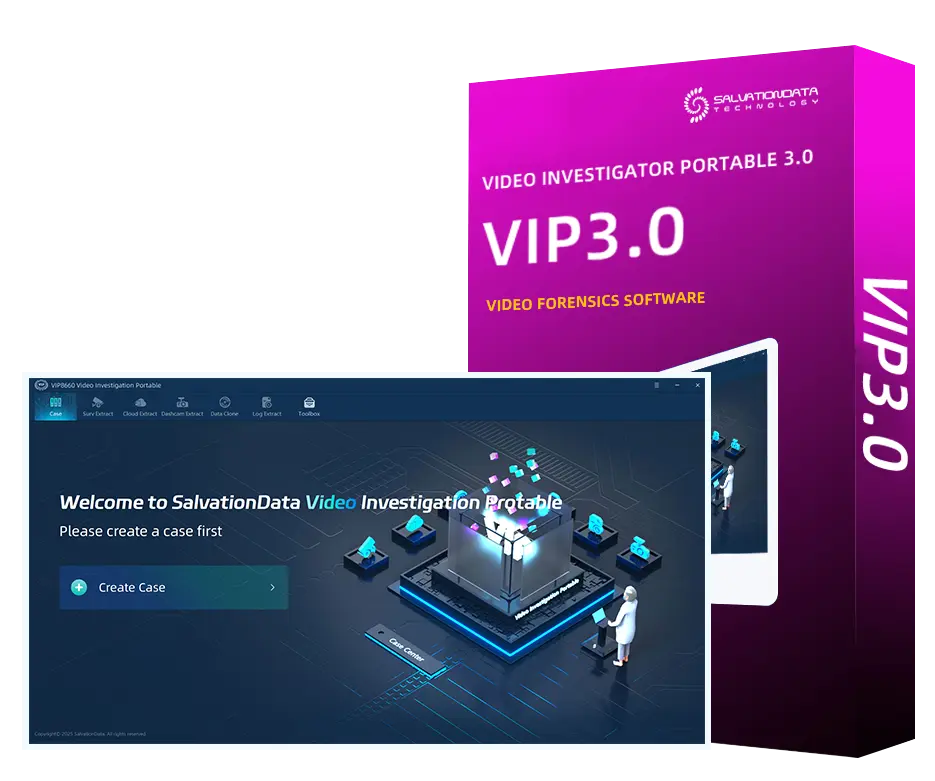
VIP 3.0 (Video Investigation Portable) recovers deleted, lost, or fragmented video from CCTV DVR/NVR storage.

  • Supports major surveillance brands including Hikivision, Honeywell, Dahua and more.
  • Recovers and extracts critical dashcam footage from deleted, damaged, or inaccessible storage, turning hard-to-access recordings into usable video evidence.
  • Not free — but purpose-built for a use case (video evidence) that the tools aboikivisionve don’t directly address.

AFA9500 for Integrated Mobile Forensics

SalavtionData AFA9500-Next Gen Mobile Forensics

AFA9500 is a software-based mobile forensics solution designed for fast, on-scene extraction. It can also be paired with SalvationDATA’s dedicated hardware to maximize acquisition efficiency. The solution supports both device and cloud evidence, including iCloud, WhatsApp, and Telegram backups. This allows investigators to handle different sources within a streamlined workflow.

  • Handles up to 8 concurrent tasks, with write protection and automatic forensic report generation.
  • Extends mobile extraction to major cloud platforms, including iCloud, WhatsApp, and Telegram.
  • Ideal for investigations that require efficient on-scene acquisition and cloud evidence collection in one workflow.

Request a free trial →

How to Choose the Right Digital Forensics Software?

1. Match the Tool to Your Sector’s Constraints

Law enforcement needs strict chain-of-custody and court-admissibility features; commercial organizations prioritize speed and data security; incident response teams need fast triage over exhaustive analysis. Start from your regulatory and operational constraints, not the feature list.

2. Individual Tools vs. a Full Suite

It’s up to you to decide if you need to buy individual tools or a suite to handle the job at hand. While individual programs have their uses, it is often more efficient to use several together. A forensics software suite, on the other hand, is a more comprehensive solution that can address multiple problems simultaneously, which can speed things up and make things easier during an investigation.

3. Privacy, Security, and Evidentiary Integrity

Confidentiality and security are of paramount importance in the field of digital forensics. The selected digital forensics software should prevent unauthorized parties from accessing the data during the review process. Always check for defensive features like encryption, authentication, and write-protection that provide an extra degree of protection for the tool. Before buying, make sure the product has been thoroughly inspected for safety flaws and conforms to all relevant regulations and standards.

4. Open-Source vs. Proprietary

Although it may take more technical know-how to effectively maintain and update open-source software, the benefits of its greater flexibility and personalization are often worth the learning curve. Many proprietary systems have intuitive interfaces and one-on-one support to help new users get up and running quickly. Many considerations go into making this decision, such as the skill level of the team, the need for unique capabilities, and a preference for either free or paid maintenance.

5. Total Cost, Not Just License Price

Factor in training time, hardware requirements, and support costs alongside the sticker price — a “free” tool that takes weeks of specialist ramp-up isn’t necessarily the cheapest option for a small team.
Frequently Asked Questions

1.What is the best free digital forensics software?

Autopsy (paired with The Sleuth Kit) is the most widely used free, open-source option for disk and file-system forensics; Volatility is the standard free option for memory forensics.

2.What’s the difference between digital forensics software and data recovery software?
Digital forensics software preserves a forensically sound, court-admissible chain of custody while recovering and analyzing data; general data recovery software is optimized for restoring lost files without the same evidentiary requirements.

3.Do I need different software for mobile vs. computer forensics?
In most cases, yes — mobile extraction (e.g., Cellebrite UFED) and computer/disk forensics (e.g., X-Ways, FTK) use different acquisition methods.

4.Do these tools support multi-examiner collaboration on the same case file?
Enterprise suites like FTK and Magnet AXIOM are built with concurrent multi-examiner review and centralized case management in mind; lighter tools such as Autopsy and X-Ways are primarily single-examiner workflows unless paired with separate case-management infrastructure. Factor this in if your lab regularly runs multi-person investigations.

5.Will output from these tools hold up as admissible evidence in court?
Admissibility depends less on the tool itself and more on whether the acquisition process is forensically sound — write-blocking, hash verification (MD5/SHA-256) at acquisition and again before analysis, and a documented, unbroken chain of custody. Courts generally expect the examiner to be able to explain and defend the methodology, not just present the tool’s report.

6.What’s the realistic learning curve if my team is moving from one platform to another (e.g., FTK to X-Ways)?
Expect a meaningful ramp-up period even for experienced examiners, since artifact interpretation and workflow conventions differ between platforms — this is a real cost to factor in alongside license price when switching tools, not just a one-time inconvenience.

Conclusion

There’s no single “best” digital forensics tool in 2026 — the right choice depends on whether you’re working disk images, mobile devices, memory dumps, or cloud accounts, and how much of that work you need to consolidate into one suite versus handling with specialized point tools. Match the tool to the evidence type and your team’s constraints first; budget and learning curve should be the tie-breaker, not the starting point.