What Is a Digital Forensics Lab? Definition, Function & Setup Guide

Knowledge
2022-01-22

Last Update: 2026-8-10

A digital forensics lab — sometimes called a digital forensic laboratory or simply a digital lab — is a dedicated facility where investigators collect, recover, analyze, and report on evidence stored on computers, phones, storage media, and other digital devices. Unlike a single-purpose forensic tool, a lab combines hardware, software, and standardized procedures into one workflow, so evidence can be handled in a way that holds up to legal scrutiny.

For law enforcement, military, and corporate investigators alike, a properly equipped digital forensic lab is what turns scattered digital data into evidence a court can actually rely on.

Why Modern Investigations Need a Digital Forensic Lab

Technology moves faster than most investigators can track on their own. Every new phone, app, and storage format adds another layer of complexity to an already data-heavy job.

A few forces are driving the shift toward dedicated labs:

  • Volume and complexity — modern cases routinely involve data from multiple devices and formats at once, which single tools struggle to process together.
  • Efficiency — an integrated workflow cuts the time between evidence intake and a usable report.
  • Credibility — the public increasingly expects the kind of high-tech investigative capability they see portrayed in the media; agencies without it risk looking under-equipped.

How Does a Digital Forensics Lab Function?

Forensic laboratory workflow showing evidence intake, secure extraction, sealed storage, device-specific analysis, findings review, and final reporting

Digital Forensic Laboratory Workflow: From Evidence Intake to Final Report

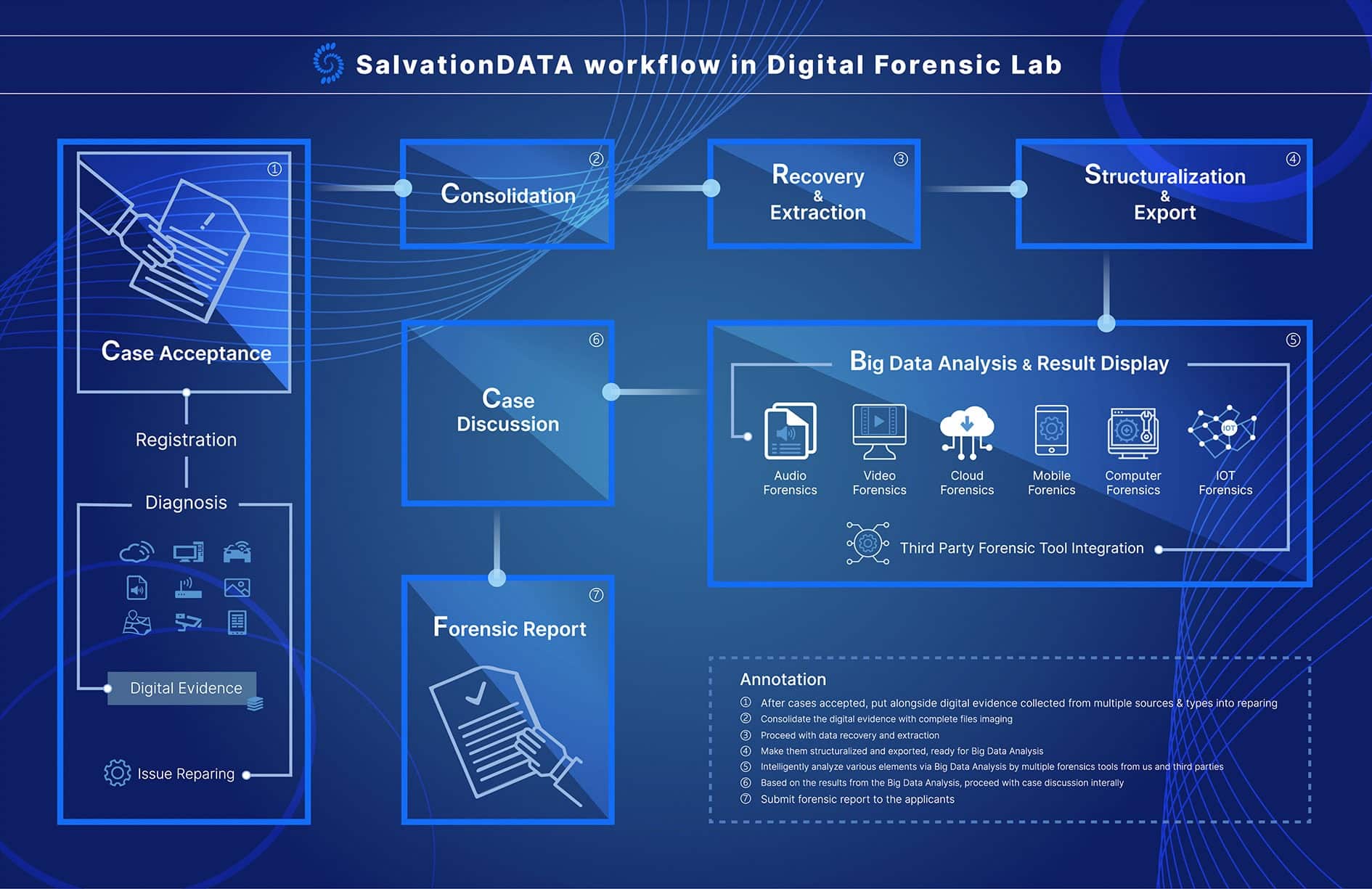
A well-run lab follows a structured, repeatable process rather than handling each case ad hoc. A typical workflow looks like this:

  1. Case Acceptance — evidence and initial statements are logged the moment a case begins, before formal registration.
  2. Consolidation — data gathered from different sources and devices is brought together in one place.
  3. Recovery & Extraction — evidence is pulled from devices using methods appropriate to their hardware, file system, and any protection in place.
  4. Structuring & Export — recovered data is converted into unified formats so later analysis tools can process it automatically.
  5. Analysis & Visualization — investigators work through the structured data to surface meaningful findings, often with visual/statistical support.
  6. Case Discussion — findings are reviewed among investigators and stakeholders before conclusions are finalized.
  7. Reporting — a forensically sound report is generated, documenting each step so the evidence remains admissible.

This process typically runs on a mix of hardware (forensic workstations, secure evidence storage, IT infrastructure) and specialized software covering video, mobile, computer, and audio forensics — plus supporting systems like access control and case management.

In practice, this logical sequence maps onto a physical path through the lab. Evidence is logged in at a secured intake point, then moved to an isolated extraction station where write-blockers ensure only a verified copy — never the original — is used for analysis. That copy travels to dedicated workstations for the relevant device type, while the original is sealed and held in access-controlled evidence storage for the rest of the case. Findings, working copies, and the original are tracked separately at every handoff, so the chain of custody stays intact from intake through to the final report.

In short: Intake & Logging → Secure Extraction (write-blocked) → Evidence Storage (original sealed) → Device-Specific Analysis → Findings Review → Final Report.

Digital Forensic Lab vs. Single Forensic Tools

A common question when budgets are tight: why not just buy a few standalone tools instead of building a full lab? It’s a fair instinct — a single tool is cheaper upfront and faster to bring online. But that calculation tends to change once a lab handles more than a handful of straightforward cases.

Comparison of a digital forensic lab and standalone forensic tools across coverage, consistency, cross-device correlation, total cost, and scalability

Digital Forensic Lab vs. Standalone Tools: Comparing Coverage, Consistency, Correlation, Cost, and Scalability

A few places where the gap shows up in practice:

  • Coverage. A standalone tool is usually built around one device type or file system. The moment a case involves a phone, a laptop, and a damaged hard drive together, investigators end up juggling several disconnected tools and manually stitching the results back into one narrative.
  • Consistency. A lab environment enforces the same intake, extraction, and reporting steps on every case. With separate point tools, that consistency depends entirely on whoever happens to be running each one that day — which is exactly the kind of gap a defense attorney will look for.
  • Cross-device correlation. Real investigations increasingly hinge on connecting evidence across multiple sources — a timeline that only holds together if data from different devices was captured and structured in comparable formats to begin with.
  • Total cost over time. Licensing several standalone tools, training staff on each one separately, and manually reconciling their outputs adds up in labor cost, even when the initial software price looks lower than a lab build-out.
  • Scalability. A single tool that works for today’s caseload rarely scales cleanly as case volume or device diversity grows; a lab’s infrastructure is built with that growth in mind from the start.

None of this means standalone tools are never the right call — for a small team handling a narrow, predictable case type, one or two focused tools can still be the more practical choice. The trade-offs, and where that line typically sits, are covered in more depth in Why Digital Forensic Lab Is Irreplaceable by Single Forensic Tools.

Building In-House vs. Bringing in a Professional Solution

Some agencies try to assemble a lab piece by piece using open-source tools and repurposed hardware. On paper, it looks like the cheaper option — no vendor contract, no big upfront invoice. In practice, the real cost usually shows up later, in places that are easy to underestimate when the project is first being scoped.

Common places where an improvised build ends up costing more than expected:

  • Integration gaps. Tools and hardware picked up piecemeal weren’t designed to work together, so someone on the team ends up spending real hours bridging formats and manually reconciling outputs between systems.
  • Training and knowledge silos. Without a standardized platform, expertise tends to concentrate in whoever originally set the system up — and case throughput takes a direct hit if that person leaves or is out.
  • Maintenance burden. Open-source and repurposed components often lack dedicated support, so updates, compatibility fixes, and troubleshooting fall on internal staff instead of a vendor’s support line.
  • Evidence integrity risk. A patchwork of tools makes it harder to guarantee a consistent, defensible chain of custody across every case — which is precisely where opposing counsel will look for a weak point.
  • Hidden scaling costs. What works for a handful of cases a month often breaks down as volume grows, at which point the agency is rebuilding under time pressure rather than by choice.

A professionally built lab front-loads these costs into the setup phase instead of letting them surface unpredictably later. We go through exactly where improvised setups tend to fail in more detail in 4 Hidden Issues With an Improvised In-House Digital Forensic Lab.

When Do You Need a Digital Forensics Lab?

Deciding to have a new digital forensics lab or updating an existing one is a huge decision that needs resources in terms of time, funds, and human resources. Thus, it is important to weigh all factors carefully before investing in a digital forensic lab of your own.

Though the situation in every law enforcement agency is different, pay special attention to the following factors we conclude.

1. Outdated Digital Forensics Equipment

Have a critical look at the current equipment in your digital forensic lab and answer the following questions.

  • When was the last time you updated your hardware and software and are they up-to-date ?
  • Are your tools and equipment comprehensive and integrated enough for efficient and scientific operation ?
  • Are you able to extract evidence from the myriad of today’s digital devices in a forensically sound manner?
  • Has your digital evidence been rejected and inadmissible by the court of law due to compromised integrity and incredibility?

We suggest you answer the above questions at the very beginning for the necessity of a new digital forensic lab.

2. High Case Volume

Most law enforcement agencies face high case volume, and the delay in the processing of digital evidence is one major cause of backlogs.

If the personnel in your department are not able to cope with the number of cases, it is a sign that your department needs a digital forensic lab.

A digital forensic lab will outstandingly improve the work with the same or even less energy and human resource.

3. Increasing Crimes Related to Digital Evidence

The relevance of digital evidence is increasing in multiple ways, and some kind of digital evidence is surfacing in almost every case. In addition to the increasing relevance, cybercrimes, crimes of mostly digital nature, are on the rise.

If your department is witnessing many cases where digital evidence is an important factor, it might indicate the need for a digital forensic lab.

How to Get Started

Four-step guide to starting a digital forensic lab, from assessing needs and choosing a provider to overseeing the build and planning training and maintenance

How to Get Started: Four Steps to Building a Digital Forensic Lab

Getting started comes down to four steps: assess your current setup and needs, choose a lab contractor or provider, oversee the build with regular feedback, and plan for training and ongoing maintenance from day one — not as an afterthought.

For the full step-by-step breakdown, see How to Set Up a Digital Forensic Lab? (7 Steps to Approach). If you want more detail on the specific tools, standards (like ISO/IEC 17025), and lab divisions involved, see Setting Up a Forensic Lab: Key Components and Best Practices.

What Do You Benefit from a Complete Digital Forensics Lab?

Once the workflow, the tooling, and the setup decisions are in place, the payoff goes beyond the obvious — and some of the less visible gains are worth weighing before making a final call:

  • Staying current, without doing it alone. Working with an experienced lab provider means your team gets outfitted with today’s forensic tools and trained on them directly, rather than trying to track every new technology shift in-house.
  • A higher share of cases actually get solved. Digital evidence now factors into most modern casework, so a lab that can reliably process it translates directly into fewer cases stalling out unsolved.
  • More case throughput without more headcount. A modern, streamlined workflow lets the same team handle a heavier caseload, instead of efficiency being capped by how many people are on staff.
  • A visible signal of competence. An outdated, disorganized setup reads to the public as an agency not taking evidence handling seriously; a properly equipped lab signals the opposite.

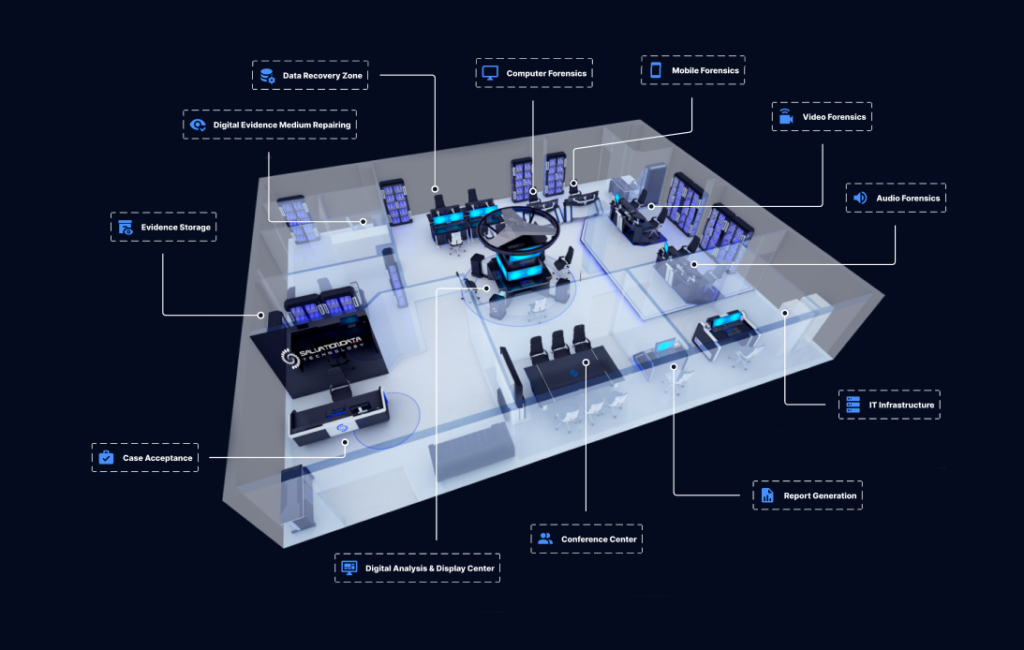
This is exactly what a lab is meant to deliver in practice — and it’s the standard SalvationDATA’s Lab Constructor solution is built around. Rather than treating hardware, software, and training as separate purchases, SalvationDATA works from your actual forensic needs and the physical space or building you have available, then delivers a tailored implementation around it — including a preview of what the finished lab will look like, the matched forensic hardware, on-site installation, and training and after-sales support once the lab is running.

Workflow of salvationdata digital forensic lab

Complete Your Forensic Workflow withSalvationDATA’s One-stop Solution

In short, it’s a one-stop project rather than a checklist of separate vendors: needs consultation up front, a visual preview of the planned layout, on-site installation, and post-installation debugging and training to get the team fully up to speed. And because it’s built around the mainstream forensic disciplines a lab is likely to need, coverage spans from mobile devices to computers, data recovery, and on-scene investigation — assessing an agency’s needs and equipping the lab with a set of purpose-built forensic systems:

Digital Lab Division in SalvationDATA

SalvationDATA’s One-stop Solution of Digital Forensic Lab

AFA9500 mobile forensics software solution

  • AFA9500 — mobile forensics: extracting, recovering, and analyzing data from smartphones and mobile devices, with exportable data reports.

New Video Forensic Software-VIP3.0

  • VIP3.0 — video forensics: recovering deleted, lost, or fragmented video footage for rapid case analysis.

SalvationData DRS-Data Recovery System

  • DRS (Data Recovery System) — an all-in-one recovery tool for acquiring and recovering data from both healthy and damaged storage media such as HDDs.

SalvationDATA Database Forensic Solution- DBF

  • DBF (Database Forensic Analysis System) — targets deleted, corrupted, or fragmented database files and restricted application data.
  • FAS7900 — a computer forensics extraction kit built for on-scene investigation: fast, non-invasive acquisition of memory and disk images without disassembling the machine.
  • Automotive Forensic System — retrieval and analysis of vehicle electronic data (EDR, OBD, dash cam, and more), including automated accident reconstruction and reporting.
  • Audio Forensics — analysis of audio evidence alongside the lab’s video and data capabilities.
  • Video and Image Authenticity verification System — dedicated capability for examining visual evidence.
  • Case Management System — for tracking and managing evidence across the life of a case.

Beyond the forensic systems themselves, a fully equipped lab also includes the facility-level infrastructure that ties everything together:

  • Forensic Workbench — a dedicated workbench for hands-on evidence handling and examination.
  • Intelligent Forensic Workstation — a purpose-built workstation for rapidly acquiring and analyzing digital evidence.
  • Intelligent Data Analysis and Visualization Center — a dedicated space for analyzing and presenting evidence findings.
  • Security Locker — secure storage that protects the confidentiality of physical and digital evidence.
  • Conference Center — a space for case discussion and collaboration among the investigation team.
  • IT Infrastructure (Server, UPS, LAN) — the underlying systems that keep the lab running reliably.

FAQs

  1. Q: What is a digital forensics lab?
    A: A dedicated facility that combines hardware, software, and standardized procedures to recover, analyze, and report on evidence from digital devices in a legally defensible way.
  2. Q: What’s the difference between a digital forensics lab and a crime lab?
    A:
    A traditional crime lab typically focuses on physical evidence (DNA, fingerprints, ballistics). A digital forensics lab focuses specifically on data from computers, phones, and other digital devices, though the two often work alongside each other on the same case.
  3. Q: What tools does a digital forensics lab use?
    A:
    Labs typically combine disk/data capture tools, file analysis software, mobile and memory forensic tools, and video/audio forensic systems, along with hardware like write blockers, forensic workstations, and secure evidence storage.
  4. Q: Do small departments need a full digital forensics lab?
    A:
    Not always immediately — but as digital evidence becomes a larger share of caseloads, even smaller departments tend to reach a point where a dedicated lab becomes more cost-effective than juggling standalone tools.

Conclusion

A digital forensics lab plays an important role in the effective handling of digital forensic evidence, and consequently, in the success of law enforcement agencies and their personnel.

By comprehensive examination on your law enforcement agencies, digital forensics workflow and circumstances, more hints on the necessity of a new digital forensic lab is going to be concluded.

However, setting up a modern digital forensic lab requires high levels of technical knowledge and years of experience. Not many law enforcement agencies have such expertise and it is highly recommended to consult a reputed digital forensic lab consultant that can help you set up the forensic lab according to your needs.