

Understanding the Checkm8

Knowledge
2025-07-01

Checkm8 is a powerful, unpatchable exploit in Apple’s SecureROM that affects millions of devices, including iPhones and iPads up to the iPhone X. First disclosed by axi0mX in 2019, the Checkm8 exploit enables persistent low-level access for jailbreaking, security research, and forensic data extraction. Unlike typical software exploits, Checkm8 leverages a hardware-level vulnerability that Apple cannot fix through updates.

In this guide, you’ll learn how Checkm8 works, how it bypasses Apple’s Secure Boot Chain, and how to use Checkm8 safely for research and lawful analysis. Whether you’re exploring Checkm8 jailbreak methods or studying iOS security, understanding Checkm8 will deepen your knowledge of how hardware exploits can transform device access and analysis.
The introduction of Checkm8

Whats checkm8?

Checkm8 is a bootrom exploit that affects many Apple devices. Checkm8 takes advantage of a SecureROM (bootrom) vulnerability, a read-only memory sector that boots the device upon turning it on. Because the bootrom cannot be updated or patched by Apple in a software update, the Checkm8 exploit is an unpatchable, permanent hardware bug on affected devices.

Because the bootrom is read-only and cannot be modified after the device leaves the factory, this exploit enables persistent low-level access for security researchers, jailbreak developers, and forensic analysts. It allows for actions such as jailbreaking, bypassing certain security restrictions, and accessing data for forensic extraction while requiring physical access to the device.

The application of Checkm8

Applications of Checkm8: Activation Lock Bypass, Jailbreaking, and Data Extraction

The Checkm8 exploit enables several important practical applications in security research, device forensics, and advanced device management on Apple devices. Key use cases include:

Jailbreaking:

  • Allows users and researchers to bypass Apple’s software restrictions.
  • Enables installation of unauthorized apps, system customizations, and access to system files.
  • Checkm8-based jailbreaks persist across firmware versions due to targeting the SecureROM.

Activation Lock Bypass:

  • Activation Lock is designed to prevent unauthorized access to an Apple device linked to an Apple ID.
  • Checkm8-based tools can bypass Activation Lock when legally authorized, enabling forensic access to locked devices.
  • Useful for investigators to access devices without the associated Apple ID credentials.

Data Extraction and Forensics:

  • Facilitates the extraction of user data and system files from locked devices for forensic analysis.
  • Allows retrieval of critical evidence in lawful investigations where the device is locked or encrypted.
  • Enables low-level device analysis without requiring the passcode.

Important Note: Checkm8 requires physical access to the device to execute, which limits its misuse in remote attacks while making it valuable for legitimate research and forensics.

A Technical Overview of How Checkm8 Works

Exploitation Point: SecureROM / BootROM Stage

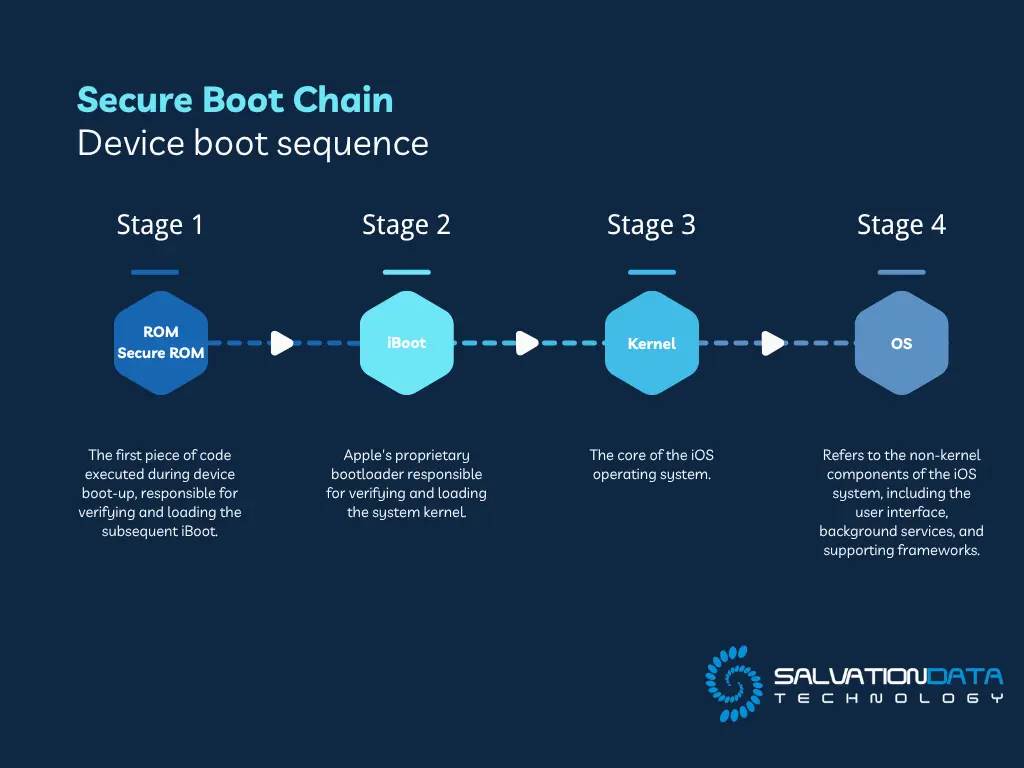
Device boot sequence:

  1. ROM (SecureROM / BootROM): The first piece of code executed during device boot-up, responsible for verifying and loading the subsequent iBoot.

  2. iBoot: Apple’s proprietary bootloader responsible for verifying and loading the system kernel.

  3. Kernel: The core of the iOS operating system.

  4. OS: Refers to the non-kernel components of the iOS system, including the user interface, background services, and supporting frameworks.

Apple Secure Boot Chain

iPhone’s Boot Sequence

Checkm8 targets the BootROM stage because:

  • It exists at the hardware level and cannot be updated.

  • By exploiting a vulnerability in SecureROM to gain code execution, it becomes possible to inject subsequent jailbreak loaders (such as checkra1n).

Technical Core: USB DFU Mode Heap Overflow

Checkm8’s key exploitation pathway:

  • DFU (Device Firmware Update) mode
  • A length-check insufficiency during USB control request handling in BootROM.
  • By crafting specific USB control requests, attackers can trigger a heap overflow, overwrite critical structures, and control execution flow.

In practice:

  • Attackers send specially crafted USB configuration requests with specific sizes and arrangements.
  • This triggers the overflow within SecureROM, allowing function pointers or return addresses to be overwritten.
  • Once arbitrary code execution is achieved, the attacker can patch memory to place the device in a controllable state.

Limitations of Checkm8

  • Requires physical access to the device and entering DFU mode; it cannot be exploited remotely.

  • The exploit state is lost upon reboot, requiring re-exploitation each time.

  • Only affects A5 to A11 chips, and A12 (iPhone XS/XR), A13 (iPhone 11), and newer chips are not affected.

The Impact of Checkm8 on Apple Users

Which Apple Devices Are Most Vulnerable to Checkm8?

Checkm8 is a hardware exploit affecting Apple devices with A5 to A11 chips. The vulnerability exists in the BootROM, which runs first when the device powers on. Since the BootROM is part of the hardware, it cannot be patched by software updates, leaving these devices permanently vulnerable.

Here’s a breakdown of the Apple devices most vulnerable to Checkm8:

  • iPhone 4S
  • iPhone 5 / iPhone 5C / iPhone5S
  • iPhone 6 / iPhone 6 Plus
  • iPhone 6S / iPhone 6S Plus
  • iPhone SE (1st Gen)
  • iPhone 7 / iPhone 7 Plus
  • iPhone 8 / iPhone 8 Plus
  • iPhone X (Certain Models)

These devices span a significant period in Apple’s hardware development, from the A5 chip in the iPhone 4S all the way up to the A11 chip in the iPhone 8 and iPhone X models. Each of these iPhones has a BootROM vulnerability that attackers can exploit with Checkm8.

iPads (Models Affected)

In addition to iPhones, several iPad models are also impacted by the Checkm8 exploit. These include:

  • iPad 2, iPad 3, iPad 4
  • iPad Air (1st Gen)
  • iPad Mini 2 and 3

These iPads, particularly the older models, remain at risk because they share the same chipset vulnerabilities as the iPhones listed above.

How to Protect Your Device from Checkm8 Exploits

Although Checkm8 can’t be fixed with software updates, there are steps you can take to protect your device from exploitation. Since Checkm8 requires physical access, preventing unauthorized access is key.

(1) Keep Your Device Secure

Checkm8 needs direct access to your device to work. To limit this risk:

  • Always keep your device with you and avoid leaving it unattended.
  • Don’t plug your device into unknown computers or chargers.

(2) Use Strong Security Settings

Even though Checkm8 can’t be fixed, Apple’s security features still help protect your device:

  • Set a strong passcode and enable Face ID or Touch ID.
  • Turn on Find My iPhone and remote wipe in case your device is lost.
  • Backup your data regularly using iCloud or iTunes.

(3) Avoid Jailbreaking

Jailbreaking weakens security and makes it easier for hackers to exploit your device:

  • Don’t jailbreak your device or install untrusted apps or tweaks.