

CDN Forensics: How to Reveal the Real IP Address Behind Modern Content Delivery Networks

Knowledge
2025-12-09

Content Delivery Networks (CDNs) are a core part of modern internet infrastructure, enabling fast, stable, and secure online services. A CDN is a distributed network of servers designed to deliver web content to users more efficiently based on their geographic location.

At the same time, reports from major CDN providers such as Cloudflare and Akamai, along with public threat intelligence and law enforcement investigations, confirm that CDNs are increasingly abused for phishing, malware distribution, and command-and-control activity. From a CDN forensics perspective, understanding this abuse does not weaken the value of CDN technology—it strengthens risk awareness and investigative capability.
The Technical Value and Core Mechanisms of CDN

What is CDN?

At its core, a CDN is designed to reduce latency, improve availability, and support large-scale global content delivery. It achieves this through a combination of distributed infrastructure, intelligent routing, and dynamic content caching. These mechanisms are also central to how CDN forensics reconstructs traffic paths and attack infrastructure.

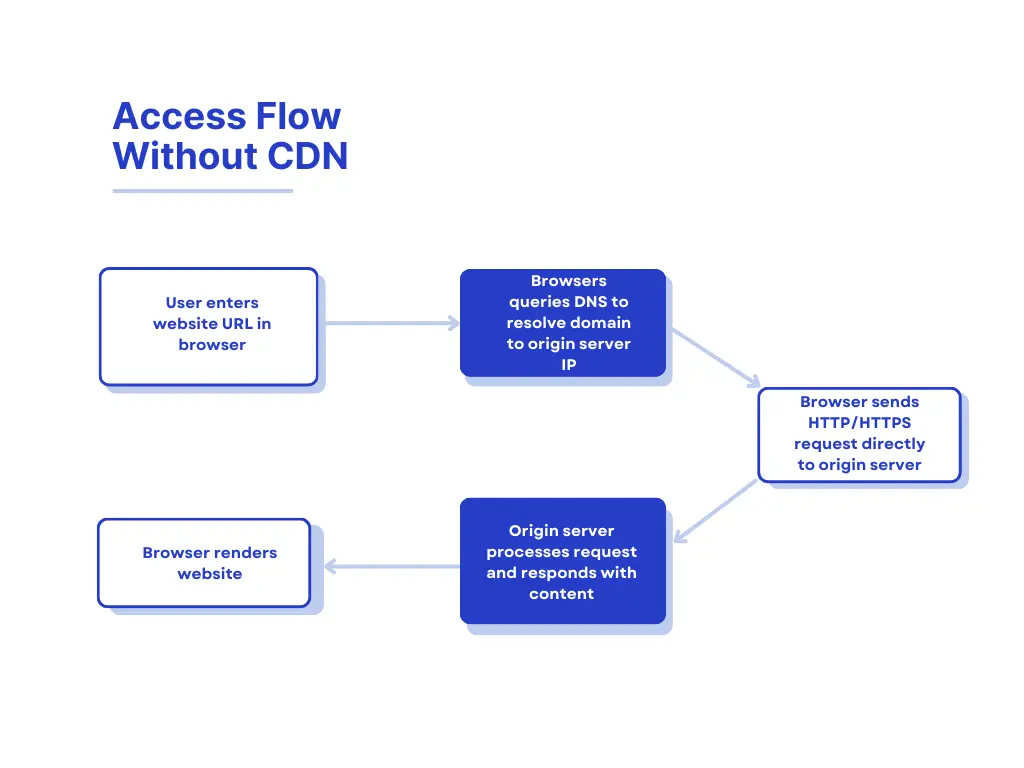
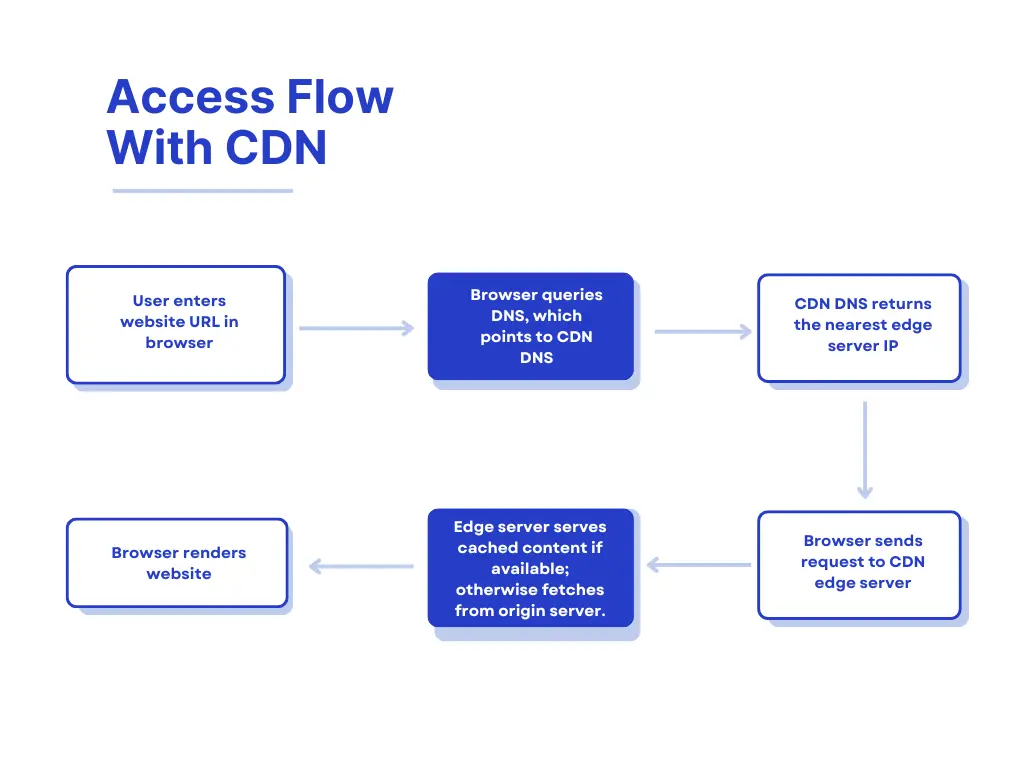
How it works in practice: Consider a user in North America trying to access a service hosted in Asia. Without a CDN, the request must travel a long distance across multiple networks, with routing delays and potential congestion causing slow load times. By deploying a CDN server in North America that caches frequently accessed content from the Asian origin server, the user can retrieve the same content locally. The CDN edge node serves the content directly, dramatically reducing latency and improving the user experience.

Internet access flow without CDN

Access Flow Without CDN

Internet access flow with CDN

Access Flow With CDN

Major CDN Providers

The global CDN market is dominated by a few key providers, each offering extensive infrastructure and specialized services:

  • Cloudflare: Known for its robust security features, DDoS protection, and global network of data centers, Cloudflare serves millions of websites and applications worldwide. It combines content caching with security services, making it a popular choice for both performance and protection.
  • Akamai: One of the earliest and largest CDN providers, Akamai operates a massive network of servers across more than 130 countries. Its platform supports high-volume content delivery, media streaming, and enterprise-level security services.
  • Amazon CloudFront: Part of Amazon Web Services (AWS), CloudFront integrates seamlessly with other AWS products, providing scalable content delivery and low-latency access for global audiences.
  • Fastly: Focused on real-time content delivery, Fastly is popular for streaming, e-commerce, and dynamic website acceleration. It emphasizes flexible caching rules and rapid deployment.
  • KeyCDN: A smaller but widely used CDN, KeyCDN offers straightforward content delivery with competitive pricing and global edge locations, often favored by startups and small businesses.

These providers illustrate the diverse range of CDN solutions available, from enterprise-level platforms to cost-effective options for smaller operators. Understanding the major players is crucial for both leveraging CDN technology effectively and studying its potential misuse in CDN forensics.

CDN Core Mechanisms

  1. When a user enters a URL in the browser, the request is first resolved by the local DNS. If the domain uses a CDN, the DNS resolution is redirected via a CNAME to the CDN’s dedicated DNS server.
  2. The CDN DNS server returns the IP address of the global load balancing system.
  3. The browser sends the request to the CDN’s global load balancer.
  4. Based on the user’s IP address and the requested URL, the global load balancer selects an appropriate regional load balancing node closest to the user.
  5. The regional load balancer then chooses the most suitable edge cache server, considering factors such as network distance and current server load.
  6. The selected edge server’s IP address is returned to the user through the global load balancer.
  7. The user sends the request directly to the assigned CDN edge server, which delivers the requested content back to the browser.
  8. If the content is not available in the local cache, the edge server retrieves it from an upper-tier cache or the origin server through the CDN’s internal routing system.
  9. Once the content is fetched, it is cached at the CDN edge node so that future requests can be served directly without accessing the origin again.

CDN Forensics

Before conducting deeper analysis or investigation, it is often necessary to first determine whether a website is operating behind a CDN. This section focuses on practical and commonly used methods to identify CDN usage, based on observable network behaviors such as DNS resolution and IP address characteristics. These techniques form the technical foundation for further analysis in CDN forensics.

Several public online tools can quickly help determine whether a domain is using a CDN. These tools are commonly used in security analysis and CDN forensics for preliminary checks.

How to check the CDN records?

  • nslookup.io (https://www.nslookup.io/)
    Used to view DNS records and CNAME chains, helping identify whether a domain resolves through a CDN network.
  • CDN Planet – CDN Finder (https://www.cdnplanet.com/tools/cdnfinder)
    A dedicated CDN detection tool that identifies the CDN provider based on IP, headers, and routing behavior.
  • MySSL CDN Check (https://myssl.com/cdn_check.html)

How to check the IP address with CDN records?

To identify a domain’s historical DNS resolution records, investigators can use the following tools. These records may reveal the real origin IP address before a CDN was deployed, which is highly valuable in early-stage analysis and CDN forensics.

  • SecurityTrails(https://securitytrails.com/)
    Provides historical DNS and IP records, allowing users to track past A records and infrastructure changes.
  • Netcraft Site Report(http://toolbar.netcraft.com/site_report?url=)
    Offers historical hosting and IP information, useful for identifying earlier server locations before CDN protection.
  • ViewDNS IP History(https://viewdns.info/iphistory/?domain=)
    Focuses on IP history lookup, showing how a domain’s resolved IP addresses have changed over time.

These tools help reconstruct a domain’s infrastructure history and may expose the original server IP used before CDN acceleration was enabled.

After confirming that a domain is protected by a CDN, investigators can use historical DNS tools to collect past IP records. Each historical IP should then be verified individually to determine whether it represents the real origin server. This verification is typically performed by checking whether the IP can directly return the website’s actual source code rather than a CDN service page.

Common verification methods include:

  • Modifying the local hosts file:
    Manually bind the target domain to the suspected origin IP in the hosts file. Then access the domain in a browser to observe the returned content.
  • Using Burp Suite for hostname resolution:
    In Project Options → Connections → Hostname Resolution, manually add a mapping between the domain and the suspected IP. This allows the analyst to test how the server responds when the domain is forced to resolve to that IP.
  • Direct IP source check via browser:
    Access the IP directly using: view-source:http://x.x.x.x. If the returned content matches the website’s real source code, the IP is likely the true origin server. If the page instead returns a default CDN provider page, a generic Nginx welcome page, an error code, or an inaccessible response, the IP should not be considered the real origin. These results usually indicate a proxy node, an unopened service port, or an intermediate server rather than the true backend host. Only IP addresses that successfully return the correct website source code should be treated as validated real origin IPs.
  • Cyberspace Engine Tool:
    Cyberspace mapping engines regularly scan and store internet assets in their databases. Searching these engines for a target can sometimes reveal its real IP address.Engine tool includes:
    1. https://search.censys.io
    2. https://www.shodan.io
  • Subdomains Check
    Due to CDN costs, major sites may use CDN while some subdomains do not. Often, subdomains share the same /24 subnet or server as the main site, allowing discovery of the main site’s real IP by probing subdomain IPs and ports.
  • SSL Certificates Check
    Certificate Authorities (CAs) are required to record every SSL/TLS certificate they issue in public transparency logs. Because these certificates typically include details such as domains, subdomains, and sometimes email contacts, they can indirectly reveal information that helps identify the origin server. While CDNs mask a site’s infrastructure, they must still exchange encrypted traffic (SSL/TLS) with the backend server. When an investigator connects to the server’s IP address or domain over port 443, the server’s SSL certificate is exposed. The certificate information shown in the browser’s padlock, along with its SHA-256 or SHA-1 fingerprint, can then be compared across logs or known datasets to trace the server’s actual IP address.
    1. SLL Check Tool: https://crt.sh/
  • Censys Check:
    The Censys search platform performs continuous, large-scale scanning across the global IPv4 space, cataloging devices and the services they expose. By leveraging its SSL certificate database, investigators can conduct internet-wide certificate queries to identify matches and correlate them with a target’s underlying, real IP address.
    1. Censys Check Tool: https://search.censys.io/certificates?q=XXXX.com
  • Email Trace:
    Most email systems operate within internal infrastructure and are not routed through CDN services. When messages are exchanged—whether through standard email delivery, RSS subscription mechanisms, or other mail sending functionalities—the raw email source can often be retrieved. The header information or source content typically discloses the server’s actual IP address. Analysts must, however, determine whether the exposed IP belongs to a mail service operated on separate infrastructure. In general, the true server IP is revealed only when the application and the website reside on the same server.

Unmasking a server’s real IP behind CDN protection remains an essential capability in cybersecurity investigations. While CDNs effectively obscure origin infrastructure, techniques such as network-mapping queries, certificate analysis, subdomain correlation, and email-header inspection can still offer actionable leads. No single method works in every scenario, but combining multiple approaches greatly increases the chance of identifying the true host and supporting accurate attribution and assessment.